/clinic-pr-review Checklist: Notebooks
Do they run from a fresh clone, keep functions in modules, and have clear names?
Remember: We're preparing students for real data science careers, not just academic assignments.
/clinic-pr-review Claude skill, then leave the review on the pull request yourselfStudent work lives in GitHub. The cycle runs from one mentor session to the next.
main. Incomplete tasks are expected and okay (provided code is pushed).One short post per project:
Code should work the same way for everyone, everywhere
Students internalize industry-level practices
Catch "works on my machine" issues early
Enable consistent, actionable feedback
For a full list of technical standards and best practices: https://dsi-rse.github.io/ta-training/technical/
import pandas as pd

df = pd.read_csv("data/survey_2023.csv")
df2 = df[df["q7"] >= 0]
p = len(df2[df2["q7"] >= 9]) / len(df2) * 100
d = len(df2[df2["q7"] <= 6]) / len(df2) * 100
print("2023:", p - d)

df = pd.read_csv("data/survey_2024.csv")
df2 = df[df["q7"] >= 0]
p = len(df2[df2["q7"] >= 9]) / len(df2) * 100
d = len(df2[df2["q7"] <= 6]) / len(df2) * 100
print("2024:", p - d)

df = pd.read_csv("data/survey_2025.csv")
df2 = df[df["q7"] >= 0]
p = len(df2[df2["q7"] >= 9]) / len(df) * 100
d = len(df2[df2["q7"] <= 6]) / len(df) * 100
print("2025:", p - d)import pandas as pd
NPS_QUESTION = "q7" # "How likely are you to recommend us?" (0–10)
PROMOTER_MIN = 9
DETRACTOR_MAX = 6
def net_promoter_score(scores: pd.Series) -> float:
"""% promoters minus % detractors, ignoring negative (missing) codes."""
valid = scores[scores >= 0]
promoters = (valid >= PROMOTER_MIN).mean()
detractors = (valid <= DETRACTOR_MAX).mean()
return 100 * (promoters - detractors)
def main(years: list[int]) -> None:
for year in years:
scores = pd.read_csv(f"data/survey_{year}.csv")[NPS_QUESTION]
print(f"{year}: {net_promoter_score(scores):+.1f}")
if __name__ == "__main__":
main([2023, 2024, 2025])Key Teaching Points: Good structure isn't about following rules - it's about making code maintainable and collaborative. Here the function has a reason to exist (it does a non-trivial thing), the comment is informative (it explains what "q7" is), names are better, computation is separated from I/O, and constants have been defined. Don't break a tiny script into functions that just wrap a pandas call or repeat error-checking pandas already does.
def clean_survey_data(df):
    # Print debugging - can't be controlled
    print("Starting with", len(df), "rows")

    # Remove invalid responses
    df = df[df['score'] > 0]
    print("After score filter:", len(df))

    # Remove outliers
    df = df[df['score'] < 100]
    print("After outlier removal:", len(df))

    return df

# No tests - hope it works!# Manual testing in notebooks
df = pd.read_csv('data.csv')
result = clean_survey_data(df)
# Visual inspection only
result.head()import logging
logger = logging.getLogger(__name__)
def clean_survey_data(df: pd.DataFrame) -> pd.DataFrame:
"""Clean survey data with logging and validation."""
logger.info(f"Starting data cleaning with {len(df)} rows")
# Validate input
required_cols = ['score', 'user_id']
missing = set(required_cols) - set(df.columns)
if missing:
raise ValueError(f"Missing columns: {missing}")
# Remove invalid responses
initial_count = len(df)
df_clean = df[df['score'] > 0]
removed = initial_count - len(df_clean)
logger.info(f"Removed {removed} rows with invalid scores")
# Remove outliers (configurable threshold)
outlier_threshold = 100
df_final = df_clean[df_clean['score'] < outlier_threshold]
outliers = len(df_clean) - len(df_final)
logger.info(f"Removed {outliers} outlier rows")
logger.info(f"Cleaning complete: {len(df_final)} rows remaining")
return df_finalimport pandas as pd
# ARRANGE: Set up test data
test_data = pd.DataFrame({
'user_id': [1, 2, 3, 4],
'score': [85, -5, 95, 0]
})
# ACT: Call the function
result = clean_survey_data(test_data)
# ASSERT: Verify the expected behavior
assert len(result) == 2, f"Expected 2 rows, got {len(result)}"
assert all(result['score'] > 0), "All scores should be positive"
print("✓ Test passed: Invalid scores removed correctly")
# Test error handling
test_data_bad = pd.DataFrame({'other_col': [1, 2, 3]})
try:
clean_survey_data(test_data_bad)
assert False, "Should have raised ValueError"
except ValueError as e:
assert "Missing columns" in str(e)
print("✓ Test passed: Missing columns detected")Key Teaching Points: Systematic debugging saves time and builds professional habits. Look for print statements instead of logging and functions without error handling. The Arrange-Act-Assert pattern structures tests clearly - simple assertions are usually sufficient. While pytest is the professional standard, basic assertions help students start testing without additional tools.
# Dockerfile
FROM ghcr.io/astral-sh/uv:python3.12-bookworm-slim

WORKDIR /app

# Copy dependency files
COPY pyproject.toml uv.lock ./

# Install dependencies using uv
RUN uv sync --frozen --no-dev

# Copy source code
COPY . .

# Default command
CMD ["uv", "run", "python", "app.py"]
# Makefile
IMAGE=project-name
.PHONY: build run test lint sync
build:
docker build -t $(IMAGE) .
run:
docker run --rm -it \
-v $(PWD):/app -w /app \
$(IMAGE) uv run python app.py
test:
docker run --rm -it \
-v $(PWD):/app -w /app \
$(IMAGE) uv run pytest -q
lint:
docker run --rm -it \
-v $(PWD):/app -w /app \
$(IMAGE) uv run ruff check .
sync:
docker run --rm -it \
-v $(PWD):/app -w /app \
$(IMAGE) uv syncKey Teaching Points: Modern Python packaging with uv provides faster, more reliable dependency management. Check that projects have pyproject.toml, uv.lock is committed, and make commands use `uv run`. This workflow eliminates "works on my machine" problems.
def load_and_clean_survey_data(
    file_path: str | Path,
    required_columns: list[str] | None = None,
    drop_duplicates: bool = True,
    verbose: bool = False,
) -> pd.DataFrame | None:
    """Load, validate, and clean survey data robustly."""
    try:
        path = Path(file_path)
        if not path.exists():
            logger.warning(f"File not found: {path}")
            return None
        df = pd.read_csv(path)
    except Exception as e:
        logger.error(f"Failed to load data: {e}")
        return None

    if required_columns is None:
        required_columns = ["user_id", "score"]
    for col in required_columns:
        if col not in df.columns:
            logger.warning(f"Missing column: {col}")

    if drop_duplicates:
        df = df.drop_duplicates()

    try:
        df["score"] = pd.to_numeric(df["score"], errors="coerce")
    except Exception:
        pass

    df = df[df["score"] > 0]
    if verbose:
        print(f"✅ Loaded {len(df)} rows")
return dfdef load_valid_responses(path: Path) -> pd.DataFrame:
"""Load survey responses with a positive score."""
df = pd.read_csv(path, usecols=["user_id", "score"])
return df[df["score"] > 0]try/except and return None turn clear errors into silent bad dataKey Teaching Points: Linters handle line-level style now. Spend your review on size and purpose: Is this the least code necessary? Can the student say why each piece exists? Does it fail loudly when something is wrong? Students must request general clean-ups periodically.
PR descriptions, READMEs, issue comments, and notebook markdown are read by humans. Be merciless: expect them to be short, clear, and readable.
## Summary
This PR introduces a comprehensive, robust, and
scalable data cleaning pipeline that significantly
enhances the overall quality and reliability of
our survey analysis workflow.

## Key Features
- **Robust Data Cleaning**: Implements
  comprehensive validation to ensure...
- **Enhanced Logging**: Provides detailed
  insights into every stage of...
- **Error Handling**: Gracefully handles
  a wide range of edge cases...

## Rough edges worth knowing
- Score coercion is load-bearing here — bad
  values become NaN and quietly drop out.

## Testing
All functionality has been thoroughly tested
to ensure correctness and robustness.Closes #12.
Adds `load_valid_responses()` in `src/survey/load.py`.
It drops rows with non-positive scores (about 4% of
the partner's file).
To check: `make test`, then `make run-pipeline`.
Output is `output/dept_averages.csv`.
Open question: should a score of 0 count as valid?<details>Key Teaching Points: Hold text to the same standard as code. Request changes on a PR description, README, or notebook just as you would on bad code. Weekly reports must be written entirely by the student.
Claude Code is useful for code reviews; we've provided a /clinic-pr-review skill.
/clinic-pr-review/clinic-pr-review in the project directoryThis is our first time using this skill; please provide feedback! You can reach out to discuss on Slack, or you can post issues or contributions to the repo: https://github.com/dsi-rse/skills/.
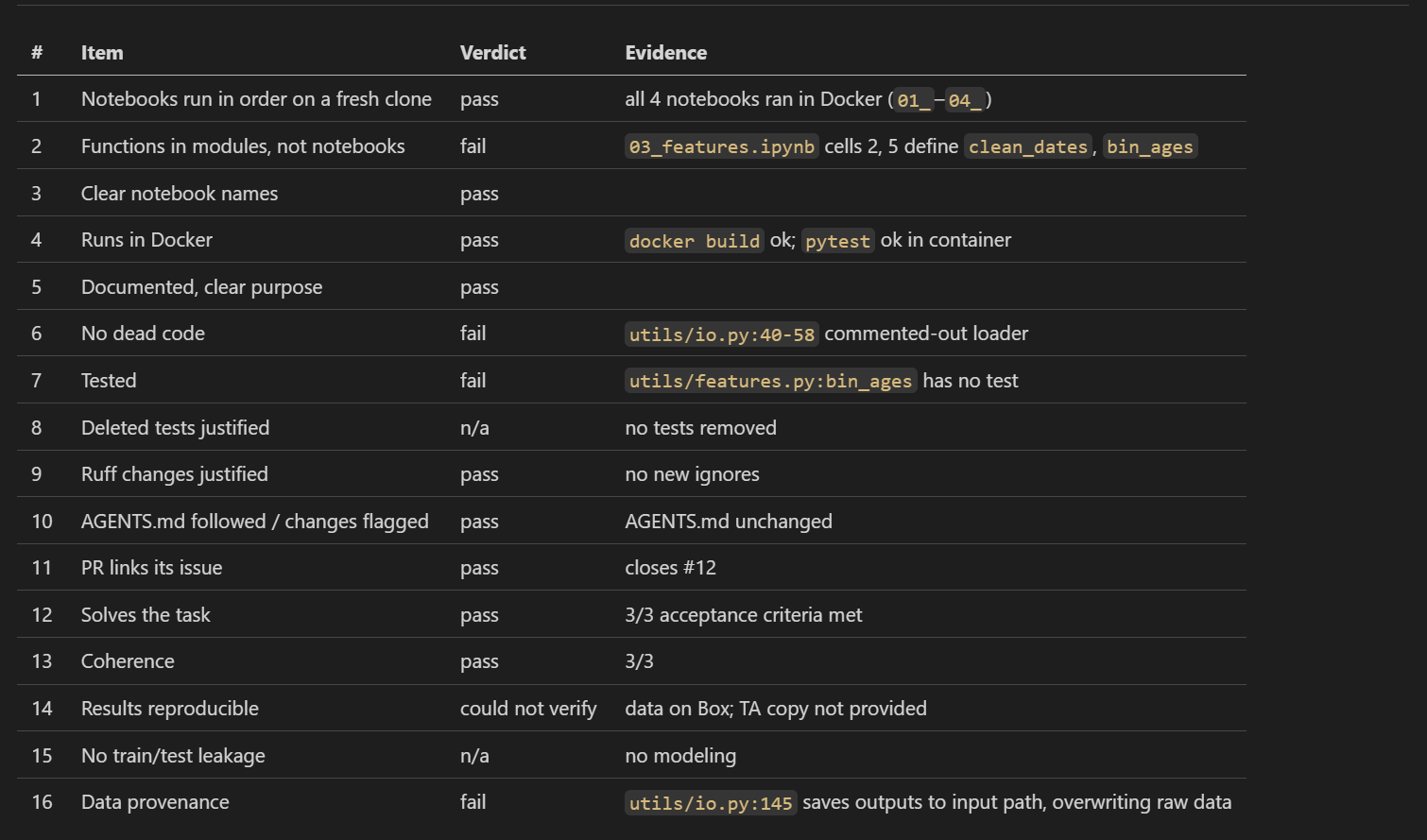
/clinic-pr-review Checklist: NotebooksDo they run from a fresh clone, keep functions in modules, and have clear names?
/clinic-pr-review Checklist: CodeDoes it run in Docker, is it documented, tested, free of dead code, and free of shortcuts?
/clinic-pr-review Checklist: DirectionDoes the PR link its issue and actually do what the task asked?
/clinic-pr-review Checklist: Data ScienceCan the results be reproduced, and is the test set kept clean?
def process_survey_data():
    data = pd.read_csv('/Users/alice/Documents/clinic/survey_data.csv')

    print("Data loaded successfully!")

    # Remove invalid responses
    clean_data = data[data['satisfaction_score'] > 0]

    # Calculate statistics
    avg = clean_data['satisfaction_score'].mean()
    dept_stats = clean_data.groupby('department')['satisfaction_score'].mean()

    # Save results
    results = {'overall_avg': avg, 'dept_averages': dept_stats.to_dict()}

    with open('analysis_results.json', 'w') as f:
        json.dump(results, f)

    print(f"Analysis complete! Average satisfaction: {avg}")
return results# 1. Create feature branch
git checkout -b jd/my-feature
# 2. Work and commit regularly
git add .
git commit -m "Add data validation"
# 3. Keep current with main
git checkout main && git pull
git checkout jd/my-feature && git rebase main
# 4. Open PR when ready
# 5. Address feedback
# 6. TA merges after approvalKey Teaching Points: Feature branches encourage experimentation without fear of breaking main. Squash merging keeps history clean and makes it easy to rollback entire features. Help students understand that messy commits on feature branches are fine - the final merge is what matters.
/clinic-pr-review<details> … </details>Use it if and when you find it useful. Sometimes a manual review without Claude assistance may be easier.
Key Teaching Points: Hold your own reviews to the standard you hold students to. If you wouldn't accept a wall of AI text in a student's PR, don't post one in your review.
If students build a UI for any reason (e.g., a data dashboard), they can take more of a "vibecoding" approach. The code does not need to be reviewed line-for-line, but the PR should say it was vibecoded.
For more code review guidelines and best practices: https://dsi-rse.github.io/ta-training/technical/code-review.html
/Users/alice/project/data.csvprocess(), calc()Instead of: "Fix the paths"
Try:
I notice this hardcoded path might break on other machines:
df = pd.read_csv('/Users/alice/project/data.csv')Could we use a relative path instead? Something like:
from pathlib import Path
data_path = Path(__file__).parent / 'data' / 'survey.csv'
df = pd.read_csv(data_path)
This way anyone can run your code.
Some of the hardest problems you'll see in a TA session aren't about code at all.
Key Teaching Points: Help with these issues when possible, but it can be difficult as a TA to gain a deep understanding of the data and other elements of the content. If students are struggling with these issues, notify the mentor and technical advisor.
Most projects fail slowly and quietly. Escalate early rather than absorbing the problem yourself.
Via the mentor-TA Slack channel.
If a student can't get their computer set up for a week, that's already ~12% of work time wasted.
The mentor will likely escalate to the clinic director.
# Good escalation message:
"I've noticed 3 teams this week struggling with Docker setup on Windows machines.
They're getting permission errors when mounting volumes. This is blocking their
ability to run `make test`.

Suggested fix: Add Windows-specific Make targets or update the handbook with
Windows Docker Desktop configuration steps.

This affects ~40% of our current cohort. Can we address this in Friday's
all-hands meeting?"TA expectations, TA session checklist, and escalation: https://clinic.ds.uchicago.edu/mentor-ta/
Every code review, every standard enforced, every coaching conversation shapes how students will approach data science throughout their careers. The habits they learn here will serve them for years to come.
Let's discuss any questions about:
Full handbook available for reference
Examples in technical/examples/ directory
Additional topics covered in appendix slides
Questions? Reach out anytime!
These slides cover essential topics for TAs working with students. Use them as reference during code reviews and student interactions.
Topics covered: Repository hygiene, type hints, Python best practices, Pydantic validation, configuration management, dependency management, I/O separation patterns, and logging & error messages.
# While PR is under review, continue building on it
git checkout jd/current-feature
git checkout -b jd/current-feature-part2

# Continue development
git add . && git commit -m "Build on current feature"

# When current PR merges, update and open new PR
git checkout main && git pull
git checkout jd/current-feature-part2
git rebase mainKey Teaching Points: Code debt accumulates quickly over a quarter. Help students develop habits of regular maintenance and prompt response to feedback. A clean repository is easier to review, understand, and maintain.
def process_data(data, config):
    # What type is data?
    # What does config contain?
    # What gets returned?
    result = analyze(data, config)
return resultdef calculate_average(scores):
return sum(scores) / len(scores)
# Later...
calculate_average("85,90,78") # TypeError!def process_survey_data(
data: pd.DataFrame,
config: AnalysisConfig
) -> dict[str, float]:
"""Process survey data and return statistics."""
result = analyze(data, config)
return resultdef calculate_average(scores: list[float]) -> float:
"""Calculate mean of numeric scores."""
return sum(scores) / len(scores)
# Type checker catches error before runtime
calculate_average("85,90,78") # mypy error!Key Teaching Points: Type hints aren't just documentation - they're early error detection. Focus on public functions and anywhere data types aren't obvious. Help students see how type hints make code self-documenting and catch bugs before runtime.
def add_item(item, items=[]):
    items.append(item)
    return items

# Dangerous! Same list shared across calls
list1 = add_item("apple")     # ["apple"]
list2 = add_item("banana") # ["apple", "banana"]results = []
for i in range(3):
# Late binding closure problem
results.append(lambda: i * 2)
# All functions return 4 (i=2)
[f() for f in results] # [4, 4, 4]def add_item(item, items=None):
if items is None:
items = []
items.append(item)
return items
# Each call gets fresh list
list1 = add_item("apple") # ["apple"]
list2 = add_item("banana") # ["banana"]results = []
for i in range(3):
# Capture i explicitly
results.append(lambda x=i: x * 2)
# Each function has its own value
[f() for f in results] # [0, 2, 4]Key Teaching Points: These aren't style issues - they're bugs waiting to happen. Help students understand why Python behaves this way.
def process_config(config_dict):
    # What if keys are missing?
    # What if values are wrong type?
    db_url = config_dict["database_url"]
    max_workers = config_dict["max_workers"]
    debug = config_dict["debug_mode"]

    # Runtime errors waiting to happen
return setup_pipeline(db_url, max_workers, debug)from pydantic import BaseModel, Field, field_validator
class PipelineConfig(BaseModel):
database_url: str = Field(..., min_length=1)
max_workers: int = Field(default=2, ge=1, le=16)
debug_mode: bool = Field(default=False)
@field_validator('database_url')
@classmethod
def validate_db_url(cls, v: str) -> str:
if not v.startswith(('postgresql://', 'sqlite://')):
raise ValueError('Invalid database URL')
return v
# Validates automatically on creation
config = PipelineConfig(**config_dict)Key Teaching Points: Pydantic isn't just validation - it's early error detection that saves debugging time. When students load configuration or API data, suggest Pydantic to catch problems before they become mysterious runtime failures.
def analyze_data():
    # Hardcoded values scattered throughout
    df = pd.read_csv("/Users/alice/data/survey.csv")

    # Magic numbers with no context
    threshold = 0.95
    min_samples = 50

    # Database connection hardcoded
    conn = sqlite3.connect("project_db.sqlite")

    # API key in source code
api_key = "sk-1234567890abcdef"# .env file (often missing .env.example)
DATA_PATH=/Users/alice/data/survey.csv
CONFIDENCE_LEVEL=0.95
MIN_SAMPLES=50
DB_URL=sqlite:///project_db.sqlite
API_KEY=sk-1234567890abcdeffrom pathlib import Path
from pydantic import Field, field_validator
from pydantic_settings import BaseSettings, SettingsConfigDict
class AnalysisConfig(BaseSettings):
"""Centralized configuration with validation."""
model_config = SettingsConfigDict(env_file=".env")
# Data paths with validation
data_path: Path = Field(..., description="Path to survey data")
output_dir: Path = Field(default=Path("./outputs"))
# Analysis parameters with constraints
confidence_level: float = Field(default=0.95, ge=0.5, le=0.99)
min_samples: int = Field(default=50, ge=1)
# External services
database_url: str = Field(..., description="Database connection string")
api_key: str = Field(..., description="External API key")
@field_validator('data_path')
@classmethod
def validate_data_path(cls, v: Path) -> Path:
if not v.exists():
raise ValueError(f"Data file not found: {v}")
return v
# Usage with automatic validation
config = AnalysisConfig()# .env.example - commit this file
DATA_PATH=./data/survey.csv
CONFIDENCE_LEVEL=0.95
MIN_SAMPLES=50
DATABASE_URL=sqlite:///your_database.sqlite
API_KEY=your_api_key_hereKey Teaching Points: Configuration management prevents "works on my machine" problems. Look for hardcoded values, missing .env.example files, and secrets in code. Pydantic settings classes catch configuration errors early and document what's required.
# Old requirements.txt approach
pandas
numpy
scikit-learn
matplotlib
requests# Student runs on their laptop
pip install pandas numpy scikit-learn
# Works for them, breaks for teammates
# Different package versions
# Different Python versions
# Different operating systems# README.md
## Setup
1. Install Python
2. Run the code
3. Hope it works# pyproject.toml
[project]
name = "survey-analysis"
dependencies = [
"pandas==2.2.2",
"numpy==1.26.4",
"scikit-learn==1.4.2",
]
[project.optional-dependencies]
dev = [
"pytest==8.1.1",
"ruff==0.4.2",
]# Dockerfile
FROM ghcr.io/astral-sh/uv:python3.12-bookworm-slim
WORKDIR /app
COPY pyproject.toml uv.lock ./
RUN uv sync --frozen --no-dev
COPY . .
CMD ["uv", "run", "python", "app.py"]# README.md
## Setup
1. Install Docker Desktop
2. Clone this repository
3. Run: `make build`
4. Run: `make test`
5. Start analysis: `make run`
## Development
- `make shell` - Interactive container
- `make sync` - Update dependenciesKey Teaching Points: Modern dependency management with uv and lock files prevents collaboration breakdowns. Check for missing pyproject.toml, unpinned versions, and missing uv.lock files. Docker + uv isn't complexity - it's consistency across team members.
def analyze_survey():
    # I/O mixed with computation
    df = pd.read_csv("data/survey.csv")

    # Analysis logic
    avg_score = df['satisfaction'].mean()

    # More I/O
    with open("results.json", "w") as f:
        json.dump({"avg": avg_score}, f)

print(f"Average: {avg_score}")def calculate_satisfaction_stats(
df: pd.DataFrame
) -> dict[str, float]:
"""Pure function - easy to test."""
return {
'avg_score': df['satisfaction'].mean(),
'std_score': df['satisfaction'].std()
}
def main():
# I/O layer
df = pd.read_csv(DATA_PATH)
# Pure computation
stats = calculate_satisfaction_stats(df)
# I/O layer
save_results(stats, OUTPUT_PATH)Key Teaching Points: I/O separation makes code testable and reusable. Look for functions that both read files AND do computation - that's a refactoring opportunity. Pure functions are easier to test, debug, and understand.
def load_data(path):
    df = pd.read_csv(path)
    # FileNotFoundError: [Errno 2] No such file

    assert 'score' in df.columns
    # AssertionError (no context!)

    print("Data loaded")  # Can't control output
return dfimport logging
logger = logging.getLogger(__name__)
def load_survey_data(path: Path) -> pd.DataFrame:
if not path.exists():
raise FileNotFoundError(
f"Survey file not found: {path}\n"
f"Current directory: {Path.cwd()}\n"
f"Expected location: {path.absolute()}"
)
df = pd.read_csv(path)
required_cols = ['user_id', 'satisfaction']
missing = set(required_cols) - set(df.columns)
if missing:
raise ValueError(
f"Missing columns in {path.name}: {missing}\n"
f"Available: {list(df.columns)}"
)
logger.info(f"Loaded {len(df)} survey responses")
return dfKey Teaching Points: Good error messages are love letters to future debuggers. Replace generic exceptions with specific, actionable messages. Logging beats print statements - it can be controlled and filtered appropriately.